On this page
Put Coworker to work on your stack.
Connect Salesforce, Slack, Jira and run your first agent in minutes.
Product
September 2026 Product Updates
In September, we shipped OM2, Code in beta, a new Analytics dashboard, and new connectors.
This is the first edition of our monthly product updates, a place to share what we've shipped every month. We'd love to hear what's useful and what's not. Drop us a note at support@coworker.ai.

September opened with the launch of OM2, a new layer of intelligence that every AI model you use can now tap into. The rest of the month was about deepening it: faster lookups, smarter search, more ways to model your organization. Alongside that, we released Code in beta, rebuilt the Analytics dashboard, and expanded our connectors. Here's everything new that we shipped this month.
OM2 Launch: the organizational memory that learns continuously from your company's work

AI models have no memory of your organization. Every session rebuilds context from scratch, burning over 50% of enterprise token budgets on retrieval alone. OM2 solves this with a neural graph that continuously learns from your organization, like who your people are, what they work on, and how teams connect. It retrieves exactly the right information when needed, and when benchmarked against Claude with off-the-shelf native connectors, OM2 is:
- 9x cheaper on token costs (up to 51x with model routing)
- 64% faster end-to-end
- Preferred 84.5% of the time on quality
OM2 works with Claude, ChatGPT, Gemini, Perplexity, or your own agents via MCP or API.
Read more here.
Continued improvements to OM2: faster, smarter, more customizable

We continued to make improvements to OM2. We dropped company data lookups from 260ms to 2ms, and response times during heavy agent activity fell from 8 seconds to under 1 second.
Search got meaningfully smarter too. Coworker now handles a much wider range of timeframes (seasons, early or late in a month, "all time") and returns the best match when a name could refer to more than one person or account.
Admins can now bind a data source directly to a custom type in their knowledge graph, with a wizard that drafts the structure automatically. And a new visual explorer lets teams browse how people, accounts, and topics connect across the organization.
Coworker
Put Coworker to work on your actual stack
Connect Salesforce, Slack, Jira and run your first agent in minutes.
Code (Beta): every model your engineers need, optimized under a ceiling you set

We launched Code in beta, which gives engineering teams an AI coding assistant that already understands your business. Setup takes minutes: install, sign in through your browser, and Code is automatically connected to your Coworker workspace. From there, engineers can pull in context from your connected tools, like tickets, conversations, and docs, while they build, and choose from multiple AI models.
For IT and engineering leaders, Code runs under the same admin controls as the rest of Coworker: per-model usage caps, per-user model access, and usage reporting in the Analytics dashboard, so adoption stays visible and costs stay predictable. Beta access is rolling out to customers now.
Read more here.
Analytics Dashboard, Rebuilt
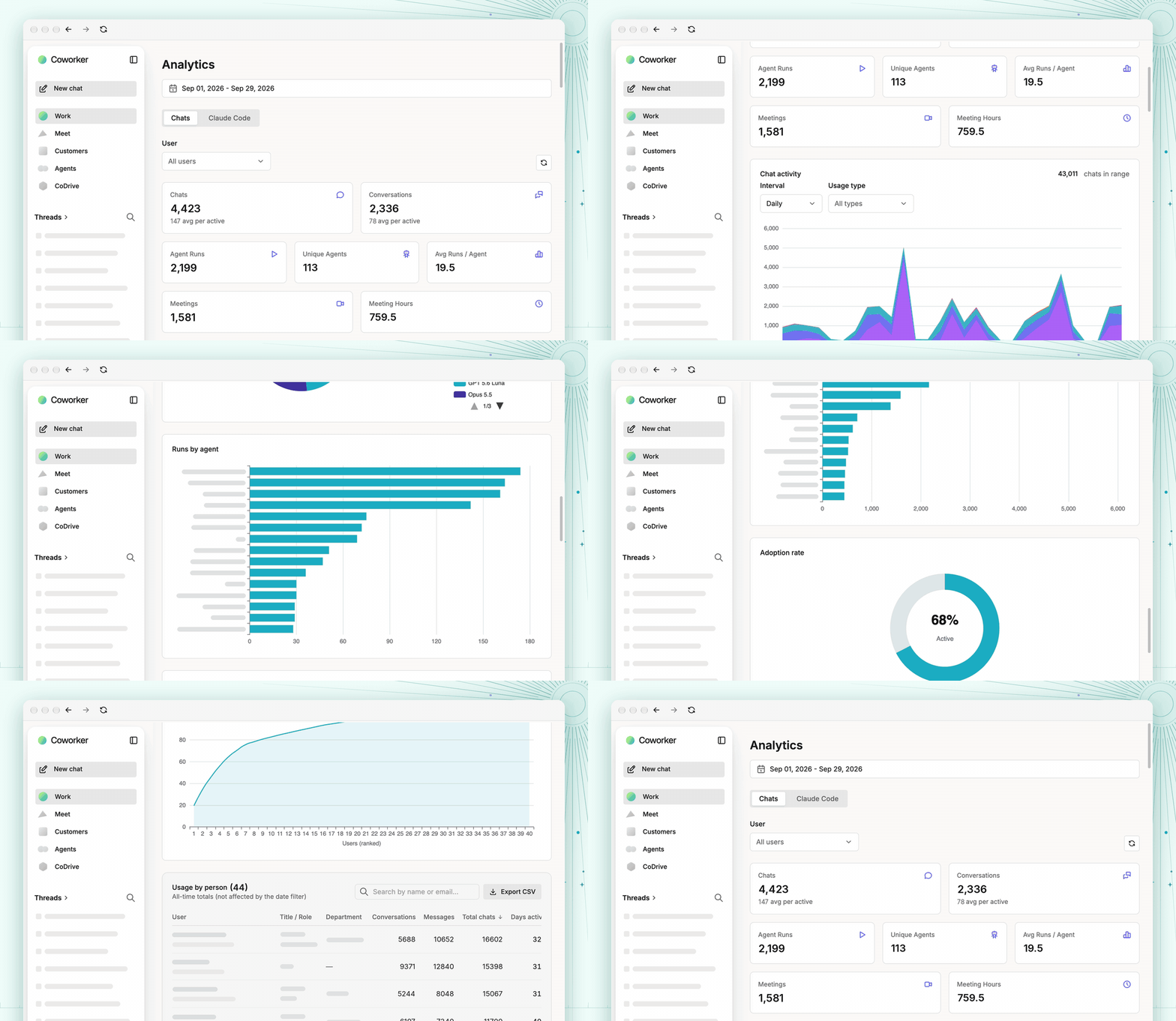
The Analytics page is now a standalone section with a cleaner layout. Admins can see how often AI agents are being run, which agents are most used, and how credits are being consumed by model. Claude Code now has its own usage breakdown. Admins can also set per-model credit caps and control which models each user can access. Full usage data is exportable to CSV.
New & Improved Connectors: Slack, GitHub, Fireflies.ai, and Jiminny

- Slack (multiple workspaces): Teams with more than one Slack workspace can now connect all of them to a single Coworker account. Each workspace connects independently and can be managed or disconnected from the data source settings. Coworker automatically searches across all connected workspaces.
- GitHub (admin connection): Admins can now connect GitHub once at the organization level, making repository activity visible to all team members without each person needing their own connection. Currently rolling out behind a feature flag.
- Fireflies.ai (now generally available): Connect with a personal API key and meeting notes appear automatically in your knowledge base.
- Jiminny (new): Call transcripts, per-participant meeting records, and AI-generated summaries can now be ingested directly into Coworker.
View a full list of our connectors.
If you're an existing customer and have questions, please reach out to us at support@coworker.ai. If you're a new customer and want to learn more, book a demo.
Ready to get started?
Put Coworker to work inside your actual stack
Connect Salesforce, Slack, Jira, whatever you use, and run your first agent in minutes.